Performance Optimization Guide
Zaoqu Liu
2026-01-26
Source:vignettes/performance-guide.Rmd
performance-guide.RmdIntroduction
This guide provides strategies for optimizing scVeloR performance when working with large single-cell datasets. We cover memory management, parallel computing, and algorithmic optimizations.
Performance Architecture
scVeloR uses a hybrid architecture for optimal performance:
┌─────────────────────────────────────────────────────────────┐
│                    scVeloR Performance Stack                │
├─────────────────────────────────────────────────────────────┤
│  R Interface Layer                                          │
│    └── Vectorized R operations (Matrix package)            │
│    └── Parallel processing (future/parallel)               │
├─────────────────────────────────────────────────────────────┤
│  C++ Core (Rcpp/RcppArmadillo)                             │
│    └── Cosine similarity computation                        │
│    └── EM algorithm core                                    │
│    └── KNN computations                                     │
├─────────────────────────────────────────────────────────────┤
│  Sparse Matrix Support                                      │
│    └── Memory-efficient storage                             │
│    └── Optimized linear algebra                             │
└─────────────────────────────────────────────────────────────┘
Memory Optimization
Sparse Matrix Usage
scVeloR automatically uses sparse matrices when beneficial:
library(Matrix)

# Check sparsity of your data
sparsity <- sum(seurat_obj@assays$RNA@counts == 0) /
            length(seurat_obj@assays$RNA@counts)
message(sprintf("Data sparsity: %.1f%%", sparsity * 100))

# Force sparse representation
seurat_obj@assays$RNA@counts <- as(seurat_obj@assays$RNA@counts, "dgCMatrix")
Memory Profiling
# Check memory usage
format(object.size(seurat_obj), units = "GB")

# Monitor during analysis
gc()  # Garbage collection
memory.size()  # Current memory usage (Windows)
pryr::mem_used()  # Cross-platform
Chunked Processing
For very large datasets, process in chunks:
# Split cells into chunks
n_cells <- ncol(seurat_obj)
chunk_size <- 10000
n_chunks <- ceiling(n_cells / chunk_size)

# Process each chunk
results <- list()
for (i in seq_len(n_chunks)) {
  start_idx <- (i - 1) * chunk_size + 1
  end_idx <- min(i * chunk_size, n_cells)

  chunk_obj <- seurat_obj[, start_idx:end_idx]
  results[[i]] <- process_velocity_chunk(chunk_obj)

  gc()  # Clean up after each chunk
}

# Merge results
final_results <- merge_velocity_results(results)
Parallel Computing
Using the future Package
library(future)
library(future.apply)

# Check available cores
availableCores()

# Setup parallel backend
plan(multisession, workers = 4)  # 4 parallel workers

# Run velocity analysis
seurat_obj <- run_velocity(seurat_obj,
                           mode = "dynamical",
                           n_cores = 4)

# Reset to sequential
plan(sequential)
Platform-Specific Configuration
# Detect OS and configure
if (.Platform$OS.type == "unix") {
  # Unix/Mac: use multicore for shared memory
  plan(multicore, workers = availableCores() - 1)
} else {
  # Windows: use multisession (separate R processes)
  plan(multisession, workers = availableCores() - 1)
}
Parallel Best Practices
| Scenario | Recommended Setup |
|---|---|
| < 10K cells | Sequential (overhead > benefit) |
| 10K - 50K cells | 4 workers |
| 50K - 100K cells | 8 workers |
| > 100K cells | Max available - 1 |
# Automatic configuration based on dataset size
n_cells <- ncol(seurat_obj)

if (n_cells < 10000) {
  n_workers <- 1
} else if (n_cells < 50000) {
  n_workers <- min(4, availableCores() - 1)
} else {
  n_workers <- availableCores() - 1
}

if (n_workers > 1) {
  plan(multisession, workers = n_workers)
}
Algorithmic Optimizations
Gene Selection
Reducing the number of genes dramatically speeds up computation:
# Use fewer genes for speed
seurat_obj <- velocity(seurat_obj,
                       mode = "dynamical",
                       n_top_genes = 1000)  # Default: 2000

# Or use highly variable genes
hvg <- Seurat::VariableFeatures(seurat_obj)
seurat_obj <- velocity(seurat_obj,
                       mode = "dynamical",
                       genes = hvg[1:500])  # Top 500 HVGs
Neighbor Graph Approximation
For large datasets, use approximate nearest neighbor algorithms:
# Exact KNN (default, slower for large data)
seurat_obj <- compute_neighbors(seurat_obj,
                                 n_neighbors = 30,
                                 method = "exact")

# Approximate KNN with Annoy (faster)
seurat_obj <- compute_neighbors(seurat_obj,
                                 n_neighbors = 30,
                                 method = "annoy",
                                 n_trees = 50)

# Approximate KNN with HNSW (fastest for very large data)
seurat_obj <- compute_neighbors(seurat_obj,
                                 n_neighbors = 30,
                                 method = "hnsw",
                                 M = 16, ef = 200)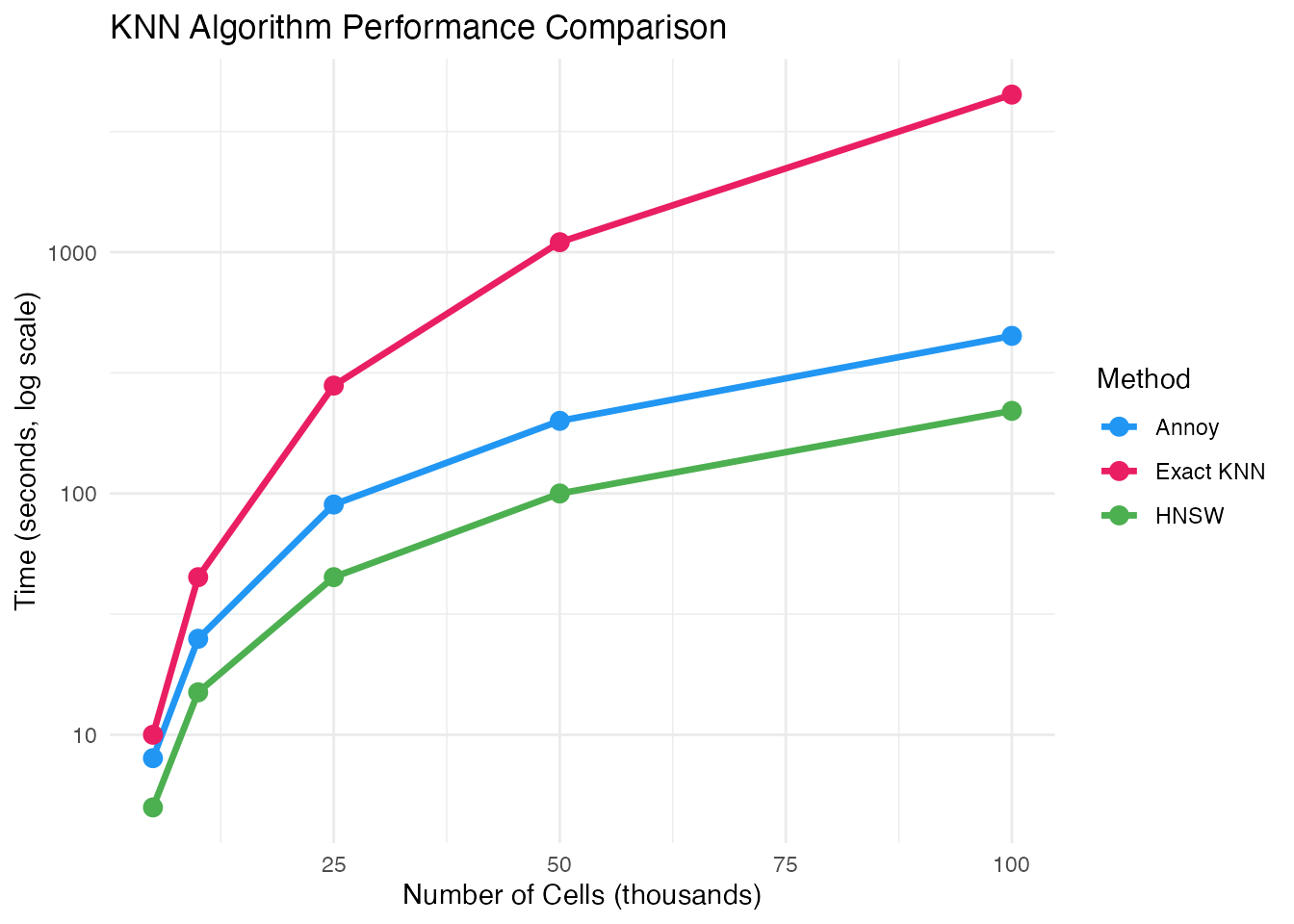
EM Algorithm Optimization
# Fewer iterations for faster (less accurate) results
seurat_obj <- recover_dynamics(seurat_obj, max_iter = 5)

# More iterations for better accuracy
seurat_obj <- recover_dynamics(seurat_obj, max_iter = 20)

# Early stopping based on convergence
seurat_obj <- recover_dynamics(seurat_obj,
                                max_iter = 20,
                                tol = 1e-4)  # Stop if change < tol
Hardware Recommendations
Profiling Your Analysis
Identifying Bottlenecks
# Use Rprof for detailed profiling
Rprof("velocity_profile.out")
seurat_obj <- velocity(seurat_obj, mode = "dynamical")
Rprof(NULL)

# Analyze results
summaryRprof("velocity_profile.out")
Practical Workflow for Large Data
Optimized Pipeline
library(scVeloR)
library(future)

# 1. Configure parallel backend
n_cores <- min(8, availableCores() - 1)
plan(multisession, workers = n_cores)

# 2. Use sparse matrices
seurat_obj@assays$RNA@counts <- as(
  seurat_obj@assays$RNA@counts, "dgCMatrix"
)

# 3. Preprocessing with filtering
seurat_obj <- prepare_velocity(
  seurat_obj,
  min_counts = 30,     # Stricter filtering
  min_cells = 50,
  n_neighbors = 30
)

# 4. Use approximate KNN
seurat_obj <- compute_neighbors(
  seurat_obj,
  method = "hnsw",
  n_neighbors = 30
)

# 5. Velocity with fewer genes
seurat_obj <- velocity(
  seurat_obj,
  mode = "dynamical",
  n_top_genes = 1000,  # Reduced from 2000
  max_iter = 8,        # Reduced from 10
  n_cores = n_cores
)

# 6. Build velocity graph
seurat_obj <- velocity_graph(
  seurat_obj,
  n_neighbors = 30,
  n_cores = n_cores
)

# 7. Reset backend
plan(sequential)
gc()
Memory-Efficient Visualization
# Subsample for visualization
set.seed(42)
sample_idx <- sample(ncol(seurat_obj), min(5000, ncol(seurat_obj)))

# Create subsampled plot
p <- plot_velocity(seurat_obj[, sample_idx],
                   embedding = "umap",
                   n_arrows = 500)

# Save to file instead of displaying
ggsave("velocity_plot.pdf", p, width = 8, height = 6)
Troubleshooting Performance Issues
Common Issues and Solutions
| Issue | Cause | Solution |
|---|---|---|
| Out of memory | Dense matrices | Use sparse matrices |
| Slow KNN | Large dataset | Use HNSW |
| Long EM runtime | Too many genes | Reduce n_top_genes |
| Worker errors | Memory per worker | Reduce workers or increase RAM |
Quick Diagnostics
# System info
Sys.info()
.Machine$sizeof.pointer  # 4 = 32-bit, 8 = 64-bit

# R memory limit (Windows)
memory.limit()

# Check for data issues
sum(is.na(seurat_obj@misc$scVeloR$Ms))  # NA values
range(seurat_obj@misc$scVeloR$Ms)       # Value ranges
Summary
Key optimization strategies:
- Memory: Use sparse matrices, chunk processing for very large data
-
Parallelization: Use
futurepackage with appropriate workers - Algorithms: Use approximate KNN (HNSW) for large datasets
- Parameters: Reduce genes and EM iterations for speed
Session Information
sessionInfo()
#> R version 4.4.0 (2024-04-24)
#> Platform: aarch64-apple-darwin20
#> Running under: macOS 15.6.1
#>
#> Matrix products: default
#> BLAS:   /Library/Frameworks/R.framework/Versions/4.4-arm64/Resources/lib/libRblas.0.dylib
#> LAPACK: /Library/Frameworks/R.framework/Versions/4.4-arm64/Resources/lib/libRlapack.dylib;  LAPACK version 3.12.0
#>
#> locale:
#> [1] C
#>
#> time zone: Asia/Shanghai
#> tzcode source: internal
#>
#> attached base packages:
#> [1] stats     graphics  grDevices utils     datasets  methods   base
#>
#> other attached packages:
#> [1] ggplot2_4.0.1
#>
#> loaded via a namespace (and not attached):
#>  [1] gtable_0.3.6       jsonlite_2.0.0     dplyr_1.1.4        compiler_4.4.0
#>  [5] tidyselect_1.2.1   dichromat_2.0-0.1  jquerylib_0.1.4    systemfonts_1.3.1
#>  [9] scales_1.4.0       textshaping_1.0.4  yaml_2.3.12        fastmap_1.2.0
#> [13] R6_2.6.1           labeling_0.4.3     generics_0.1.4     knitr_1.51
#> [17] htmlwidgets_1.6.4  tibble_3.3.1       desc_1.4.3         bslib_0.9.0
#> [21] pillar_1.11.1      RColorBrewer_1.1-3 rlang_1.1.7        cachem_1.1.0
#> [25] xfun_0.56          fs_1.6.6           sass_0.4.10        S7_0.2.1
#> [29] otel_0.2.0         cli_3.6.5          pkgdown_2.1.3      withr_3.0.2
#> [33] magrittr_2.0.4     digest_0.6.39      grid_4.4.0         lifecycle_1.0.5
#> [37] vctrs_0.7.1        evaluate_1.0.5     glue_1.8.0         farver_2.1.2
#> [41] ragg_1.5.0         rmarkdown_2.30     tools_4.4.0        pkgconfig_2.0.3
#> [45] htmltools_0.5.9